
Validate a Certificate
Check the details of a UKATA training certificate using our online verification service. If something does not look right, you can also request an authenticity review directly from this page.
Check a UKATA certificate
Enter the details exactly as they appear on the certificate to check them against UKATA's records.
A successful record match should not be treated as a guarantee that every aspect of a certificate or training delivery is genuine. Please report any concerns for further checks.
Enter the details
Use the learner's name, training date and unique certificate number.
Check the result
Compare the information returned with the certificate you have received.
Raise a concern
If details are inconsistent or you suspect a problem, request a further review.
What to look for on a UKATA certificate
View the current UKATA certificate example and inspect its features.
Important: A certificate's appearance is not proof of authenticity. Always use the online validation tool, and report anything that concerns you, including unexpected results or inconsistencies.
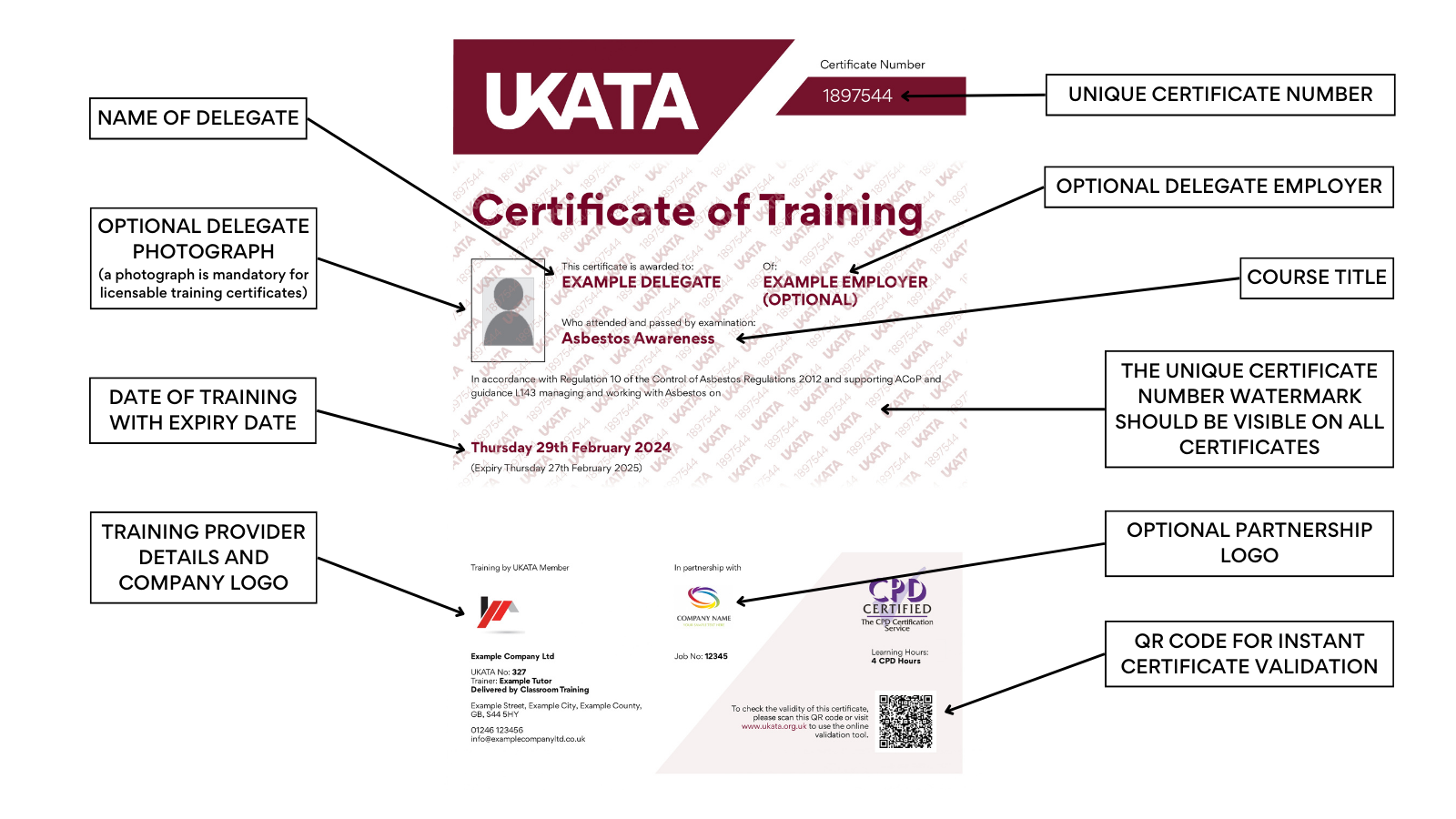
UKATA certificate example
Open the original UKATA reference image to examine the certificate details at a larger size.
Not sure whether a certificate is genuine? Please report your concern so UKATA can review it, even if the certificate matches the online record.
Certificate example
Original UKATA reference image
Report a Certificate Concern
Complete the secure UKATA Certificate Authenticity Review form below.